
Bài tập 01: Tạo ứng dụng FlashLight
Đề bài
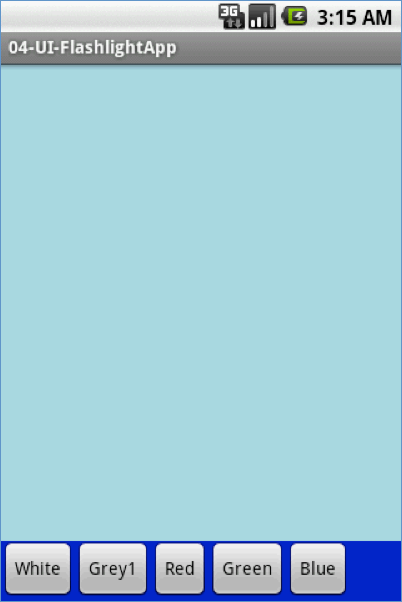
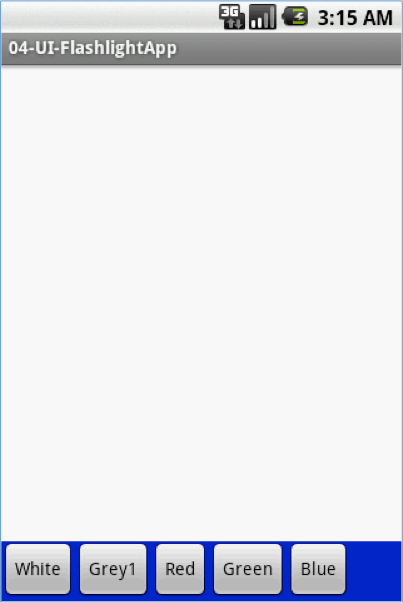
Tạo một ứng dụng đơn giản có tên FLASHLIGHT trên Android. Giao diện giống như màn hình bên dưới:
Yêu cầu
- Khi kích vào các nút màu sắc (White, Gray1, Red, Green, Blue) thì màu nền của ứng dụng đổi thành các màu tương ứng.
- Sử dụng Linear Layout hoăc Contraint Layout để thực hiện thiết kế giao diện này.
- Test ứng dụng của bạn trên thiết bị giả lập.
- Thực hiện chú thích code
- Gửi code phần giao diện (XML LAYOUT) và CODE lập trình, bao gồm cả chụp màn hình ứng dụng ứng dụng khi chạy vào phần Hỏi đáp
Code tham khảo
1. Code giao diện
<?xml version="1.0" encoding="utf-8"?>
<android.support.constraint.ConstraintLayout xmlns:android="http://schemas.android.com/apk/res/android"
    xmlns:app="http://schemas.android.com/apk/res-auto"
    xmlns:tools="http://schemas.android.com/tools"
    android:id="@+id/myFlashLight"
    android:layout_width="match_parent"
    android:layout_height="match_parent"
    android:background="#5903A9F4"
    tools:context=".MainActivity">

    <LinearLayout
        android:id="@+id/layLinear"
        android:layout_width="409dp"
        android:layout_height="50dp"
        android:background="#035BF4"
        android:orientation="horizontal"
        app:layout_constraintBottom_toBottomOf="parent"
        app:layout_constraintEnd_toEndOf="parent"
        app:layout_constraintStart_toStartOf="parent">

        <Button
            android:id="@+id/btnGray"
            android:layout_width="75dp"
            android:layout_height="45dp"
            android:layout_marginStart="8dp"
            android:layout_marginBottom="16dp"
            android:text="Gray"
            app:layout_constraintBottom_toBottomOf="parent"
            app:layout_constraintStart_toEndOf="@+id/btnWhite" />

        <Button
            android:id="@+id/btnBlue"
            android:layout_width="67dp"
            android:layout_height="45dp"
            android:layout_marginStart="8dp"
            android:layout_marginEnd="8dp"
            android:layout_marginBottom="16dp"
            android:onClick="btnClick"
            android:text="Blue"
            app:layout_constraintBottom_toBottomOf="parent"
            app:layout_constraintEnd_toEndOf="parent"
            app:layout_constraintStart_toEndOf="@+id/btnGreen" />

        <Button
            android:id="@+id/btnWhite"
            android:layout_width="67dp"
            android:layout_height="48dp"
            android:layout_marginStart="8dp"
            android:layout_marginBottom="16dp"
            android:onClick="btnWhiteClick"
            android:text="White"
            app:layout_constraintBottom_toBottomOf="parent"
            app:layout_constraintStart_toStartOf="parent" />

        <Button
            android:id="@+id/btnRed"
            android:layout_width="69dp"
            android:layout_height="45dp"
            android:layout_marginStart="8dp"
            android:layout_marginBottom="16dp"
            android:onClick="btnRedClick"
            android:text="Red"
            app:layout_constraintBottom_toBottomOf="parent"
            app:layout_constraintStart_toEndOf="@+id/btnGray" />

        <Button
            android:id="@+id/btnGreen"
            android:layout_width="73dp"
            android:layout_height="45dp"
            android:layout_marginStart="8dp"
            android:layout_marginBottom="16dp"
            android:onClick="btnClick"
            android:text="Green"
            app:layout_constraintBottom_toBottomOf="parent"
            app:layout_constraintStart_toEndOf="@+id/btnRed" />
    </LinearLayout>

</android.support.constraint.ConstraintLayout>
2. Code Java
package fita.timoday.flashlight;

import android.graphics.Color;
import android.support.constraint.ConstraintLayout;
import android.support.v7.app.AppCompatActivity;
import android.os.Bundle;
import android.view.View;
import android.widget.Button;
//Trong đoạn code này, chúng tôi demo các cách viết sự kiện khác nhau của các Button
public class MainActivity extends AppCompatActivity {
    Button btnWhite;
    Button btnGray;
    Button btnRed;
    Button btnGreen;
    Button btnBlue;
    ConstraintLayout myLayout;

    @Override
    protected void onCreate(Bundle savedInstanceState) {
        super.onCreate(savedInstanceState);
        setContentView(R.layout.activity_main);

        btnWhite = (Button)findViewById(R.id.btnWhite);
        btnGray = (Button) findViewById(R.id.btnGray);
        btnRed = (Button) findViewById(R.id.btnRed);
        btnGreen = (Button) findViewById(R.id.btnGreen);
        btnBlue = (Button) findViewById(R.id.btnBlue);
        //Lây layout cha, chú ý tên layout phải được đặt tên
        myLayout = (ConstraintLayout) findViewById(R.id.myFlashLight);
        //Viết sự kiện click trực tiếp ở trong phương thức OnCrerate
        btnGray.setOnClickListener(new View.OnClickListener() {
            @Override
            public void onClick(View view) {
                myLayout.setBackgroundColor(Color.GRAY);
            }
        });
    }
    //Viết sự kiên click ở bên ngoài
    public void btnWhiteClick(View v)
    {
        myLayout.setBackgroundColor(Color.WHITE);
    }
    public void btnRedClick(View v)
    {
        myLayout.setBackgroundColor(Color.RED);
    }
    //Cách viết cùng tên một phương thức, sẽ kiểm tra xem nút nào được chọn đển thiết lập sự kiện tương ứng
    public void btnClick(View v)
    {
        if(v==btnGreen)
            myLayout.setBackgroundColor(Color.GREEN);
        if(v==btnBlue)
            myLayout.setBackgroundColor(Color.BLUE);
    }
}